

80G & 12A Registration Guide for NGOs (Step-by-Step + Mistakes to Avoid)
Learn how to apply for 80G and 12A registration for NGOs in India. Step-by-step process, documents required, and common mistakes to avoid.
Vivek Bhos
Updated 3 min read
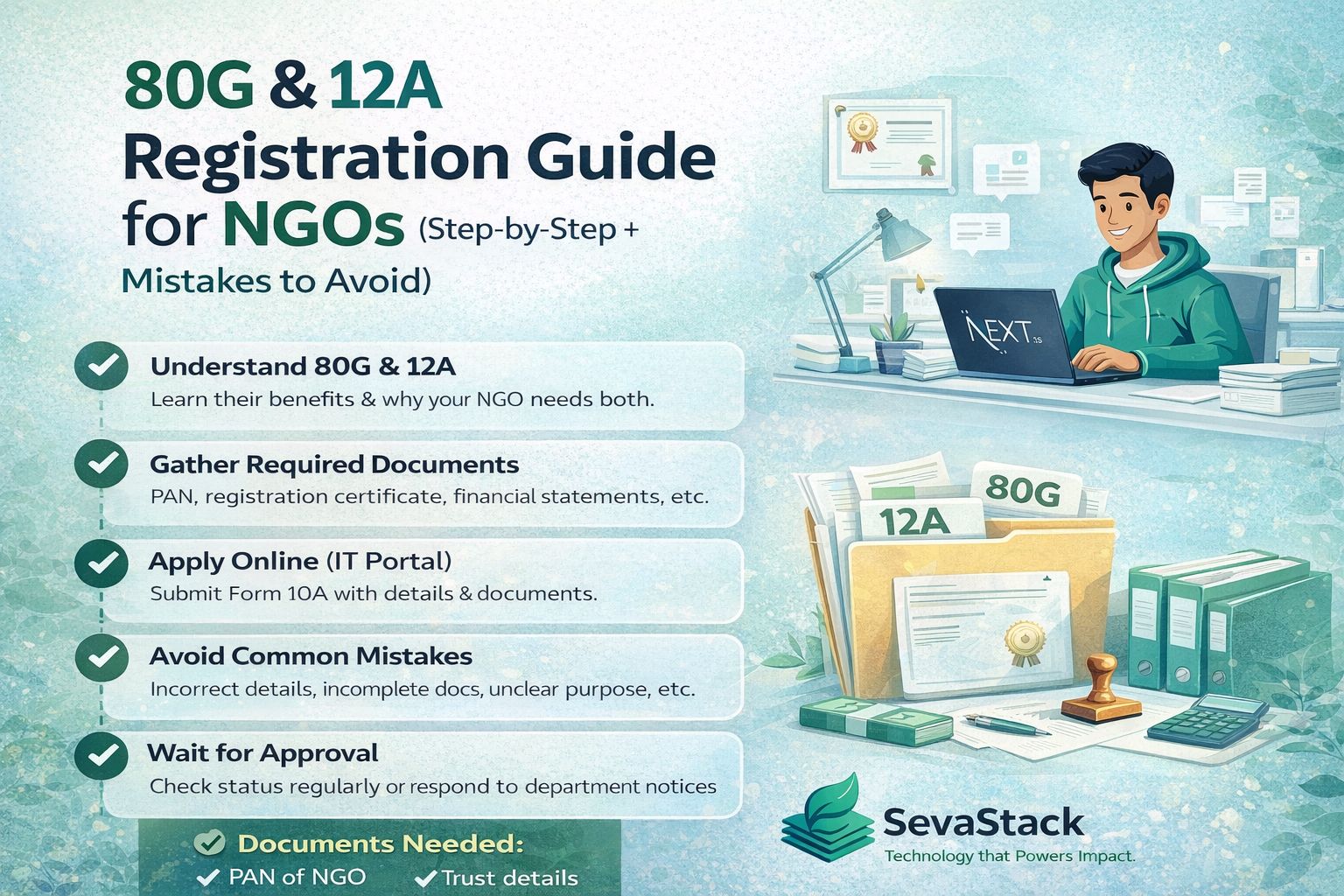
If you’re running an NGO in India, getting 12A and 80G registration is not optional anymore.
Without it:
You pay tax on your income
Donors don’t get tax benefits
Funding becomes difficult
And yet, many NGOs delay this process or make mistakes that lead to rejection.
This guide will walk you through everything — in simple language.
What is 12A Registration?
12A registration gives your NGO income tax exemption.
👉 This means your NGO does not have to pay tax on its surplus income.
Without 12A:
Even donations can be taxed.
What is 80G Registration?
80G registration allows your donors to claim tax deductions.
👉 This makes your NGO more attractive to donors.
Without 80G:
Donors may prefer giving to other NGOs.
12A vs 80G (Quick Difference)
Feature | 12A | 80G |
|---|---|---|
Benefit | Tax exemption for NGO | Tax benefit for donors |
Who benefits | NGO | Donors |
Required for | Financial sustainability | Fundraising |
👉 You need both.
Who Can Apply?
Eligible organizations:
Trusts
Societies
Section 8 Companies (NPOs)
Documents Required
Keep these ready before applying 👇
PAN card of NGO
Registration certificate (Trust/Society/Section 8)
Address proof
Details of trustees/directors
Bank account details
Activity report (if available)
Financial statements (if existing NGO)
Step-by-Step Registration Process
Everything is now done online via the Income Tax portal.
Step 1: Login to Income Tax Portal
Visit: https://www.incometax.gov.in
Step 2: Go to Registration Section
Select:
👉 “Income Tax Forms” → “File Income Tax Forms”
Step 3: Choose Form 10A
Form 10A is used for:
New 12A registration
New 80G registration
Step 4: Fill Organization Details
Include:
Name
Address
Registration type
Objectives
Step 5: Upload Documents
Make sure all documents are:
Clear
Correct
Consistent
Step 6: Submit and Verify
Submit using:
Digital Signature (DSC)
Aadhaar OTP
Step 7: Wait for Approval
The department may:
Approve directly
Ask for clarification
Request additional documents
Common Mistakes to Avoid 🚫
This is where most NGOs go wrong.
❌ 1. Incorrect or Mismatched Details
Name, PAN, and registration data must match everywhere.
❌ 2. Poor Documentation
Blurry or incomplete documents lead to rejection.
❌ 3. No Clear Objectives
Your NGO’s purpose must be clearly defined.
❌ 4. Missing Financial Records
Even basic accounting helps build credibility.
❌ 5. Not Responding to Notices
Ignoring department queries can delay or cancel approval.
How Long Does It Take?
Typically:
1 to 3 months
Depending on:
Document quality
Verification process
Why Many NGOs Struggle
Let’s be real 👇
Most NGOs don’t fail because they’re doing something wrong.
They fail because:
Everything is manual
Data is scattered
Records are not properly maintained
How SevaStack Helps
Getting 12A & 80G is just the beginning.
Maintaining compliance is the real challenge.
With SevaStack, NGOs can:
✅ Maintain clean financial records
✅ Generate 80G receipts automatically
✅ Track donations and funds
✅ Stay audit-ready at all times
👉 So when you apply or renew, everything is ready.
Final Thoughts
12A and 80G registration are the foundation of your NGO’s growth.
They help you:
Save taxes
Attract donors
Build trust
But the key is not just getting registered —
it’s staying compliant.
Because in today’s world,
transparency builds credibility.
💬 Question for You
Have you completed your 12A and 80G registration yet?
Or are you still planning to apply?
New law, same rule. From 1 April 2026 the Income-tax Act, 2025 replaced the Income-tax Act, 1961. Section 12A/12AB is now covered by Section 332. Only the number changed, not what you have to do. People still say "Section 12A/12AB", so we use it here too. Filing close to the change-over? Check the form with your CA.
Vivek Bhos
Written by the Sevastack team, who build and maintain the 80G receipt, FCRA, and Form 10BD/10BE automation used by Indian NGOs on the platform every day. Compliance guidance is reviewed against current Income Tax Act and FCRA rules before publishing.
Read next
Compliance
FCRA Annual Return (FC-4): Step-by-Step Guide for 2026
Got foreign donations? File your FCRA annual return (FC-4) by 31 December 2026. A simple step-by-step guide with documents, mistakes and a checklist.
Compliance
80G Is Now Section 133: What Changes on Your NGO Receipts
Section 80G is now Section 133 under the new Income-tax Act. Learn in simple words what changes for NGO receipts, Form 113 and Form 114, and what stays the same.
Compliance
ITR-7 Due Date Extended to 21 November: What NGOs Must Do
CBDT has extended the ITR-7 due date to 21 November 2026 and the audit report date to 21 October. Here is what your NGO should do now, step by step.
Never miss a filing date
Sevastack keeps your NGO's compliance calendar and reminds you by email and WhatsApp before each return is due. Donors, 80G receipts and accounts sit in the same place.