

How to Build a Donation Page That Actually Gets Donations
Most NGO donation pages lose donors before they pay. Here is what to fix: UPI, mobile speed, suggested amounts, PAN collection and instant 80G receipts.
Vivek Bhos
8 min read
Someone reads your story. They are moved. They decide to give ₹1,000.
They click "Donate."
Then they land on a page that takes eight seconds to load, asks for their full postal address, does not offer UPI, and makes them choose between four confusing options.
They close the tab.
You never find out. There is no notification for a donor who almost gave. This is the quietest and most expensive leak in Indian fundraising.
This guide explains how to fix it, in plain language.
The 60-second test
Open your own donation page on your phone right now — on mobile data, not office wifi. Time it.
Did it load in under 3 seconds?
Can you pay by UPI without leaving the page?
Are there suggested amounts, or an empty box?
How many fields must you fill?
Is there a monthly giving option?
Would the 80G receipt reach you automatically?
Most NGO pages fail four of these six. Every failure costs donations.
Fix 1: Put UPI first
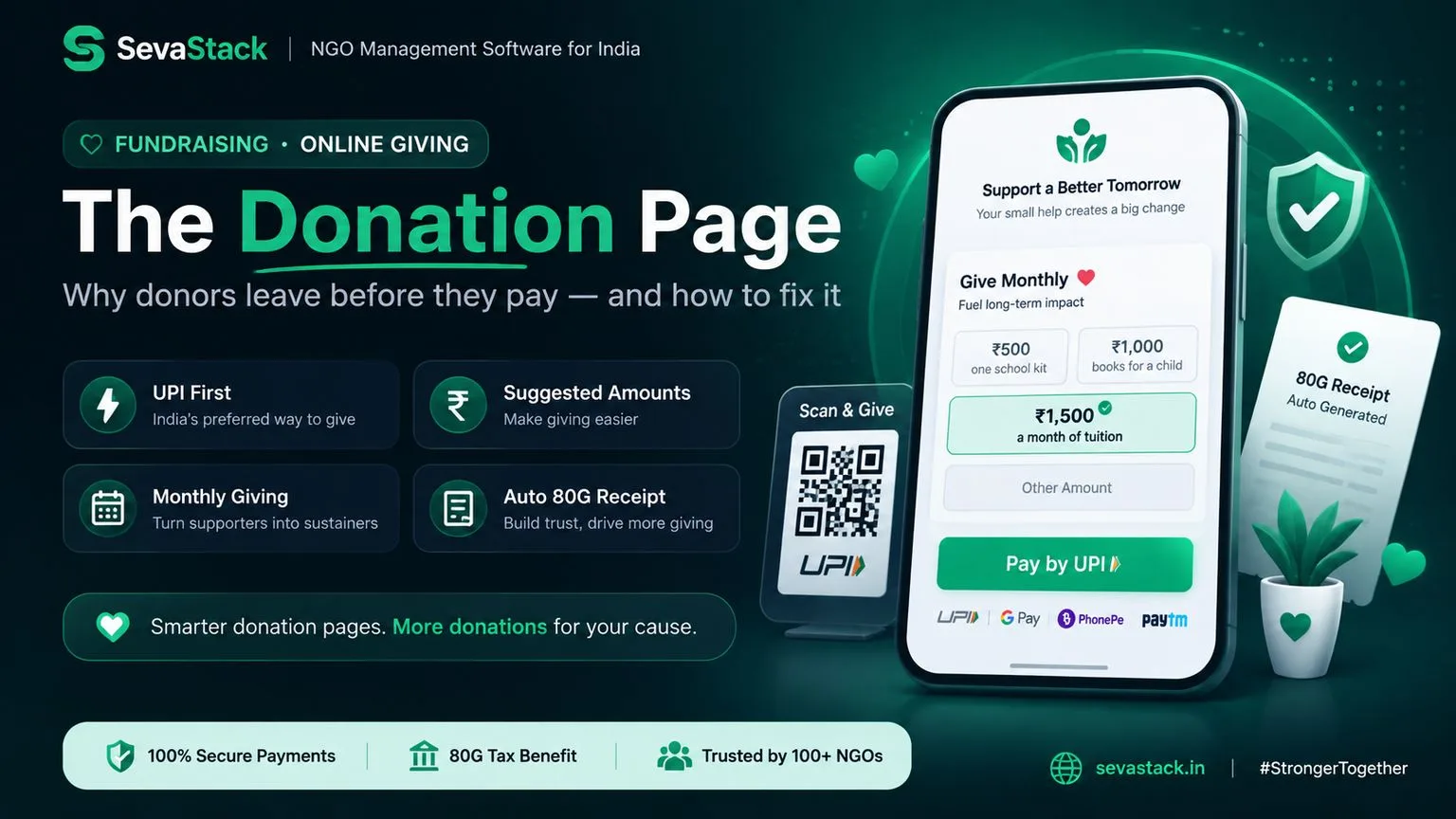
In India, UPI is how people pay. It is not one option among several — for most donors under 40, it is the only one they will use.
What this means for your page:
UPI should be the first and most visible option, not hidden under "other payment methods"
On mobile, tapping UPI should open their app directly
A UPI QR code helps for anyone giving from a desktop or from a printed poster
Cards and netbanking should be there, but secondary
One rule with real consequences: cash donations above ₹2,000 do not qualify for an 80G deduction. Digital payment protects your donor's tax benefit. Say so on the page — it is a genuine reason to pay online.
Fix 2: Suggest amounts, and attach them to things
An empty amount box makes the donor do work. They pause, they guess, and pausing is where donations die.
Give three or four suggested amounts. And attach each one to something real.
Weak:
₹500 ₹1,000 ₹2,500 ₹5,000
Strong:
₹500 — one school kit for a child ₹1,500 — a month of tuition for one student ₹5,000 — a full year of books for a classroom Other amount
People do not know what ₹1,500 of "support" achieves. They understand a month of tuition immediately.
Always keep an "other amount" option — some donors want to give more than your highest suggestion.
Fix 3: Offer monthly giving, properly
This is the biggest missed opportunity on Indian NGO donation pages.
A donor who gives ₹500 every month is worth ₹6,000 a year and, more importantly, is predictable. Predictable income lets you plan programmes and pay salaries with confidence. One-time donations do not.
Show monthly and one-time side by side, with monthly selected or at least visually equal. Do not bury it.
The rules have got easier
India's recurring payment rules were consolidated into a new RBI e-mandate framework in April 2026. For NGOs the practical position is good:
Recurring debits up to ₹15,000 per transaction go through automatically without the donor entering an OTP each time
The donor authorises the mandate once, using their UPI PIN or an OTP
They must be notified at least 24 hours before each debit, with the option to skip that payment or cancel
They can cancel any time from their own app, at no cost
Almost every monthly donation is far below ₹15,000, so recurring giving now works smoothly through UPI Autopay. If your donation page does not offer it, you are leaving your most reliable income on the table.
Be honest about cancellation. Say clearly on the page that they can stop any time. Donors hesitate over recurring payments because they fear being trapped. Removing that fear increases signups.
Fix 4: Ask for less
Every extra field loses donors. Be ruthless.
Ask for:
Amount
Name
Email
Phone
PAN (see below)
Do not ask for postal address, date of birth, occupation, how they heard about you, or anything else you will never use. Collect it later if you need it.
About PAN — you do need it
To file Form 10BD, your annual donation statement, you need each donor's PAN. Without it, your donor cannot get the 80G certificate that lets them claim a deduction.
So ask for PAN. But explain why in one line:
"PAN is needed to issue your 80G tax exemption certificate."
A field with a reason attached gets filled. A field without one gets abandoned.
Make it optional for very small donations if you like, but for anything meaningful, ask — and explain.
Fix 5: Make it fast on a phone
Most of your donors will arrive on a phone, often on patchy mobile data.
Compress images. A large hero photo can double your load time
Buttons big enough for a thumb
Correct keyboard types — the number pad should appear for amount and phone
The whole page should work in one hand, without pinching or zooming
Test on a mid-range Android phone, not just your own device
Fix 6: Get the thank-you right
The moments after payment shape whether that person ever gives again.
Immediately on screen: a clear confirmation. Not a blank page, not a spinning wheel. Tell them the payment worked and what happens next.
Within minutes, by email: the receipt, and a genuine thank you. Not a bare payment confirmation from your gateway — something in your NGO's voice.
The 80G receipt should be automatic. If a donor has to email you asking for their tax certificate, you have created work for both of you and dented their confidence. Automate this.
Later: remember that Form 10BE certificates go to donors by 31 May each year, based on the Form 10BD you file. Your donation page is where that chain begins — bad data collected here becomes a filing problem in May.
What your donation page must have
A quick checklist:
☐ Loads in under 3 seconds on mobile data
☐ UPI as the first, most visible option
☐ UPI QR code available
☐ Three or four suggested amounts, each tied to a real outcome
☐ "Other amount" option
☐ Monthly giving shown equally with one-time
☐ Clear statement that recurring donations can be cancelled any time
☐ Five fields or fewer
☐ PAN requested with a one-line reason
☐ Confirmation screen after payment
☐ Thank-you email within minutes
☐ 80G receipt sent automatically
☐ Works properly one-handed on a mid-range Android phone
☐ HTTPS and visible security
☐ Your registration numbers shown — 12A, 80G, and FCRA if applicable
Three things that quietly build trust
Show your registration numbers. 12A and 80G numbers in the footer signal that you are a real, registered organisation. Indian donors increasingly check.
Show a real photo of real work. Not stock photography. Donors can tell, and stock images suggest you have nothing of your own to show.
Show where the money goes. Even a single line — "82 paise of every rupee goes directly to programmes" — reduces hesitation.
Common questions
Should we use a crowdfunding platform instead of our own page? Platforms are useful for reach on a specific campaign, but they charge fees and, crucially, the donor relationship belongs to them, not you. Your own page keeps the donor data, which is what makes the second donation possible. Use both if you like, but own a page.
Which payment gateway should we use? Several serve Indian NGOs well. Compare on three things: UPI reliability, whether they support recurring mandates, and settlement time. Fee differences between the main options are usually small.
Is it worth having a donation page if we only get a few online donations? Yes. Low volume usually means the page is hard to find or hard to use, not that donors do not exist. Fix the page, then link to it from every email, every WhatsApp message and every social post.
How many suggested amounts should we show? Three or four, plus "other." More than that creates hesitation.
Should the highest suggested amount be large? Include one meaningfully higher option. Some donors will take it, and it makes the middle amounts feel modest by comparison.
Do we need separate pages for different campaigns? It helps. A page specifically about your Daan Utsav school kit drive converts better than a general "Donate" page, because the ask matches what brought them there.
What about foreign donors? Foreign contributions can only be received under FCRA, into your designated FCRA bank account. Keep that flow completely separate from your normal donation page and take advice before setting it up.
Where to start
If you change only one thing this week: add three suggested amounts, each attached to something real.
It takes twenty minutes and it is consistently the highest-return change most NGO donation pages can make.
Then fix the receipt so it sends automatically. Then add monthly giving.
Sevastack gives you a donation page built for India — UPI first, recurring giving through autopay, PAN collected correctly for Form 10BD, and 80G receipts issued automatically the moment someone gives. Start free — no credit card needed.
Related guides
New law, same rule. From 1 April 2026 the Income-tax Act, 2025 replaced the Income-tax Act, 1961. Form 10BD is now filed as Form 113 under Section 354(1). Only the number changed, not what you have to do. People still say "Form 10BD", so we use it here too. Filing close to the change-over? Check the form with your CA.
Vivek Bhos
Written by the Sevastack team, who build and maintain the 80G receipt, FCRA, and Form 10BD/10BE automation used by Indian NGOs on the platform every day. Compliance guidance is reviewed against current Income Tax Act and FCRA rules before publishing.
Read next
Fundraising
Diwali Fundraising for NGOs: A Simple 3-Week Campaign Plan
Diwali is on 8 November. Here is a simple 3-week plan for Indian NGOs to run a Diwali fundraising campaign, with ideas, messages and a daily checklist.
Fundraising
After Daan Utsav: How to Thank and Keep Your New Donors
Daan Utsav is over, but your work is not. Learn simple ways to thank new donors, share your impact and keep them giving all year.
Fundraising
Best Fundraising Platforms for NGOs in India (2026)
Ketto, Milaap, GiveIndia, Donatekart and more. A simple guide to the best fundraising platforms for NGOs in India in 2026, with fees and tips.
Never miss a filing date
Sevastack keeps your NGO's compliance calendar and reminds you by email and WhatsApp before each return is due. Donors, 80G receipts and accounts sit in the same place.